Les meilleures applications pour gérer son budget

Lire dans d'autres langues :
Bien savoir gérer son budget est tout un art, et il n'est pas toujours évident d'y arriver... Comment retrouver ses comptes en banque, organiser ses dépenses et ses revenus, surtout lorsque l'on est plusieurs ? Nous avons sélectionné les meilleures applications Android pour gérer son budget !
Sommaire
- Nouvelles apps de gestion des dépenses quotidiennes et du budget
- Applications créées par votre banque
- Applications tierces optimisées pour la gestion de budget
A moins de vivre dans un endroit particulièrement reculé, vous possédez certainement un compte en banque. Saviez-vous que votre banque possède sa propre application ? Elle vous permet bien évidemment de suivre vos entrées et sorties d'argent, mais aussi de procéder à différentes options bancaires telles que les virements par exemple.
Si vous utilisez l'application de votre banque, faites très attention à la sécurité de vos informations. Bien entendu, elles sont sécurisées, mais on n'est jamais trop sûr alors faites bien attention à ne pas utiliser de réseau public lorsque vous vous connectez à votre compte. Privilégiez votre connexion WiFi personnelle mais évitez la 4G ou les réseaux grand public, comme par exemple ceux de McDonald.
Nouvelles apps de gestion des dépenses quotidiennes et du budget
L'usage de votre smartphone pour mieux gérer votre budget est devenu un réflexe quotidien. Découvez ci-dessous une revue des nouveautés.
-
Gestion de budget gratuit & dépenses quotidiennes
iSaveMoney, de son nom en anglais, est une application qui permet de prendre le contrôle et de suivre l'évolution de vos dépenses. Elle offre des fonctionnalités intéressantes comme par exemple une calcutrice intégrée, la possibilité d'exporter au format CSV afin de lire les informations avec MS word ou OpenOffice, et surtout la fonctionnalité de reconnaissance vocale. Elle aide à voir plus clair en cas de difficultés financières en vous aidant à calculer votre dette en fonction de vos revenus et dépenses. Enfin, elle apporte des nouveautés telles que la possibilité de joindre des fichiers aux différents formats (PDF, JPG, etc.), une sélection de temps pour enregistrer une transaction et une meilleure gestion du tableau de bord (glisser-reposer une transaction sur le tableau de bord).
Informations :
- Mise à jour : 20 janvier 2020
- Version actuelle : 6.3.5
- Taille : 5,3 M
- Prix : 1,29 € – 5,49 € par article
- Public : Tous publics
-
Mobills : Planificateur de Budget
Cette application a déjà séduit plus de 3 millions d'utilisateurs. Elle offre des fonctionnalités nouvelles comme le gestionnaire des cartes de crédits, la possibilité de se donner des objectifs budgétaires tout comme un géolocalisation de vos dépenses (autorisation à la géolocation requise). Mais surtout, elle permet une lecture du Code QR pour l'importation des dépenses (extrêmement pratique et rapide, surtout au moment de faire les courses), ainsi qu'une synchronisation avec le cloud avec ou sans connexion. Le grand bémol reste sans aucun doute que les utilisateurs ne peuvent pas bénéficier de tous les services à moins de devenir Premium, ce qui vous coûtera quantd même 39,99 euros.
Informations :
- Mise à jour : 27 janvier 2020
- Version actuelle : Varie selon les appareils
- Taille : Varie selon les appareils
- Prix : 2,79 € – 39,99 € par article
- Public : Tous publics
-
Linxo
Cette application est la plus connectée au système bancaire global. Elle se synchronise avec 320 banques et types de comptes. A l'heure des menaces de sécurité informatique, elle offre une technologie de référence en matière de sécurisation des données bancaires. Le système compte avec l'aval de la Banque de France en matière sécuritaire et garantit que vos données ne seront jamais stockées sur votre smartphone car elles demeurent tout le temps cryptées. Linxo reconnaît automatiquement vos opérations récurrentes et permet de personnaliser vos opérations selon vos propres critères avec l'option Premium. Le grand truc en plus : la possibilité d'une extension de garantie de 12 mois sur les produits électroniques et électroménagers achetés par carte. L'autre point positif demeure une certaine volonté de faire remonter les avis des utilisateurs afin de continuer à développer l'app.
Informations :
- Mise à jour : 22 janvier 2020
- Version actuelle : Varie selon les appareils
- Taille : Varie selon les appareils
- Prix : 4,49 € – 29,99 € par article
- Public : Tous publics
Applications créées par votre banque
Il existe de nombreuses banques, ne serait-ce qu'en France. Nous ne pourrons donc pas toutes les lister ici, nous mettrons uniquement les plus connues. N'hésitez pas à taper le nom de votre banque dans la barre de recherche du Google Play, vous devriez très probablement trouver la votre.
-
L'Appli Société Générale
Comme son nom l'indique, cette application s'adresse aux clients de la Société Générale. Vous pouvez bien entendu accéder à votre historique (entrées et sorties d'argent) ainsi qu'effectuer des opérations bancaires telles que les virements. L'application vous permet également de personnaliser votre page d'accueil, d'organiser vos dépenses par catégories et de fixer vos limites afin de garder un œil sur votre budget, etc.
${app-mobi.societegenerale.mobile.lappli}-
Ma Banque (Crédit Agricole)
Ma Banque s'adresse aux clients du Crédit Agricole. Elle vous permet d'accéder à votre comptabilité (dates et montants des transactions d'entrée et de sortie) ainsi que procéder à différentes opérations bancaires. Vous pouvez également accéder à vos différents comptes si vous en avez plusieurs. Vous avez également accès à différentes options, par exemple l'accès à vos RIB etc.
${app-fr.creditagricole.androidapp}
-
Crédit Mutuel
Devinez à qui s'adresse cette application ? Vous avez trouvé, il s'agit bien des clients du Crédit Mutuel. Comme les autres applications de banque, elle vous permet de suivre l'historique de votre compte et d'effectuer des virements, d'accéder à vos coordonnées bancaires, de contacter votre conseiller, trouver les centres et distributeurs de la banque, et bien d'autres encore.
${app-com.cm_prod.bad}-
La Banque Postale
Cette application permet bien évidemment aux clients de la banque postale d'accéder à leurs comptes. Elle semble moins développée que les applications précédentes : les opérations en ligne sont limitées, l'application se focalise sur la visualisation/consultation et non sur les changements.
${app-com.fullsix.android.labanquepostale.accountaccess}Applications tierces optimisées pour la gestion de budget
L'application proposée par votre banque ne vous plaît pas ou vous semble incomplète ? Ce n'est pas un problème, plusieurs applications se sont spécialisées dans la gestion de budget.
-
Bankin', mon Budget ma Finance
Bankin' est en haut du tableau pour deux raisons : tout d'abord, elle est sécurisée, valeur essentielle pour une appli où l'on donnera une vue sur tous nos comptes en banque. Il s'agit d'une entreprise française qui prend les choses au sérieux, il n'est même pas possible de prendre des screenshots. D'ailleurs, puisqu'elle est française, vous pouvez être sûr que vous ne trouverez pas de traduction bancale effectuée sous Google Translate.
Bankin' est une des applications les plus complètes en la matière
Vous pouvez très facilement connecter vos comptes bancaires avec Bankin'. Ceci fait, vous aurez bien évidemment accès à l'historique de vos comptes, recevoir des notifications en fonction de différents paramètres, accès à des graphiques etc. Ses autres atouts : possibilité d'utiliser plusieurs comptes bancaires, très bons outils d'analyse des dépenses et recettes, synchronisation automatique.
${app-com.bankeen}-
Home Budget Manager
Pour ceux qui aiment le style "carreaux" de Windows Phone, l'application Home Budget Manager vous ravira. Que l'on aime ou non, il faut quand-même reconnaître qu'elle permet très facilement d'accéder aux options que l'on recherche.
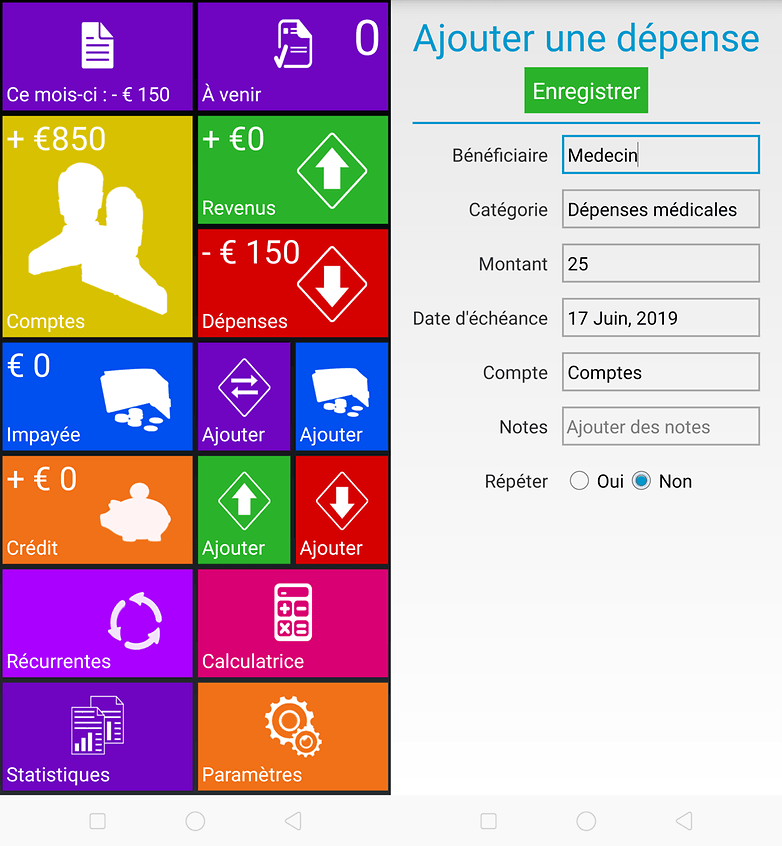
L'interface est aussi simple que l'application est efficace. © NextPit
Home Budget Manager fonctionne sur un schéma un peu plus manuel. Vous pouvez entrer toutes les données nécessaires, notamment les entrées et les sorties sur vos comptes, pour ainsi obtenir des analyses détaillées de votre budget. Cette application représente dans les grandes lignes le suivi de vos dépenses/entrées d'argent
Attention, la version gratuite est une version d'essai d'un mois. Si vous désirez utiliser l'application, il vous faudra passer à la version payante qui est à 2,49€ sur le Google Play.
${app-com.siri.budgetdemo}-
Toshl Finance
Toshl a certes un nom difficilement lisible, mais cela ne l'empêche pas d'être très simple à utiliser. De plus elle garde une petite touche d'humour grâce à un personnage qui nous accompagne dans la découverte et le suivi de l'application, ce qui est plutôt agréable.
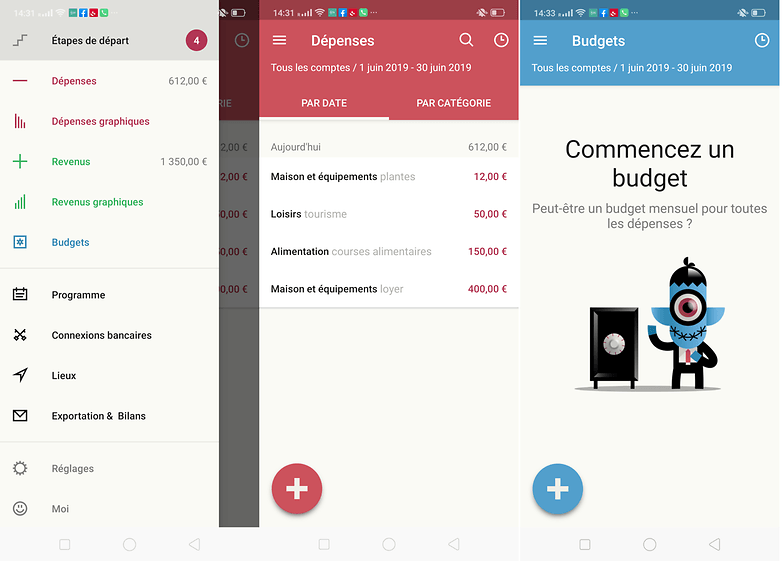
Vous entrez vous-même vos dépenses et recettes, mais vous pouvez aussi accéder au site Toshl sur navigateur pour insérer plus facilement ces données depuis votre ordinateur. Vous pouvez préparer votre suivi en paramétrant vos entrées d'argent ainsi que vos dépenses, les planifier (par exemple le paiement de votre loyer tous les 1er du mois) et l'utilisation de catégories personnalisées pour vos budgets ou dépenses (salaire, repas, essence etc).
Un compte est nécessaire pour pouvoir utiliser l'application. Une version pro existe avec plus de fonctionnalités, notamment le paramétrage d'entrées régulières.
Et vous, quelle application de budget utilisez-vous ? Avez-vous trouvé votre bonheur dans cette liste ?










J utilisé l appli de crédit agricole, celle de boursorama banque et de la banque bcp. Et pour finir J utilise bankin, que je recommande
J utilise anmoney version 1.15.5 depuis des années sans aucun problème
Il serait bien de préciser les applis françaises personnellement c'est important !
Bankin, Linxo, Max...
Quelle appli existe qui puisse se partager avec le conjoint pour qu'on y ait accès tous les deux sur notre smartphone svp ?
bankin, linxo, soi vous utiliser le même identifiant ou vous agréger le même compte dans tous les cas !
moi j'utilise visual budget simple mais me correspond
moneywiz. l'application est assez complète
J'utilise mybudgetbook c'est parfait.
Oups anmoney
Et mmoney ?
Et linxo ?
Oui, oublier Linxo n'est pas pardonnable :)